Open Source · macOS & Windows · MIT License

The invisible AI
for your interviews

Live transcription → instant AI answers → stealth HUD overlay. Completely invisible in Zoom, Meet, and every screenshare tool.

Get Started View on GitHub

5

AI Providers

0

API keys for STT

100%

Invisible in screenshare

SolveWatch HUD — ⌘⇧H to hide

🎤 Interviewer

“Can you explain how memoization works in React?”

✦ AI Answer

useMemo caches expensive computed values between renders

useCallback memoizes function references for stable props

React.memo prevents re-renders when props haven't changed

● ListeningGroq · llama-3.3-70binvisible in screenshare

Everything you need

Built for real interviews

Every feature designed around one goal: give you the answer before the silence gets awkward.

Invisible by design

The HUD uses setContentProtection(true) — the same OS API used by banking apps. Your overlay is completely excluded from Zoom, Meet, and any screenshare or recording tool. Works on macOS and Windows.

Zoom
Google Meet
Teams
Loom
OBS

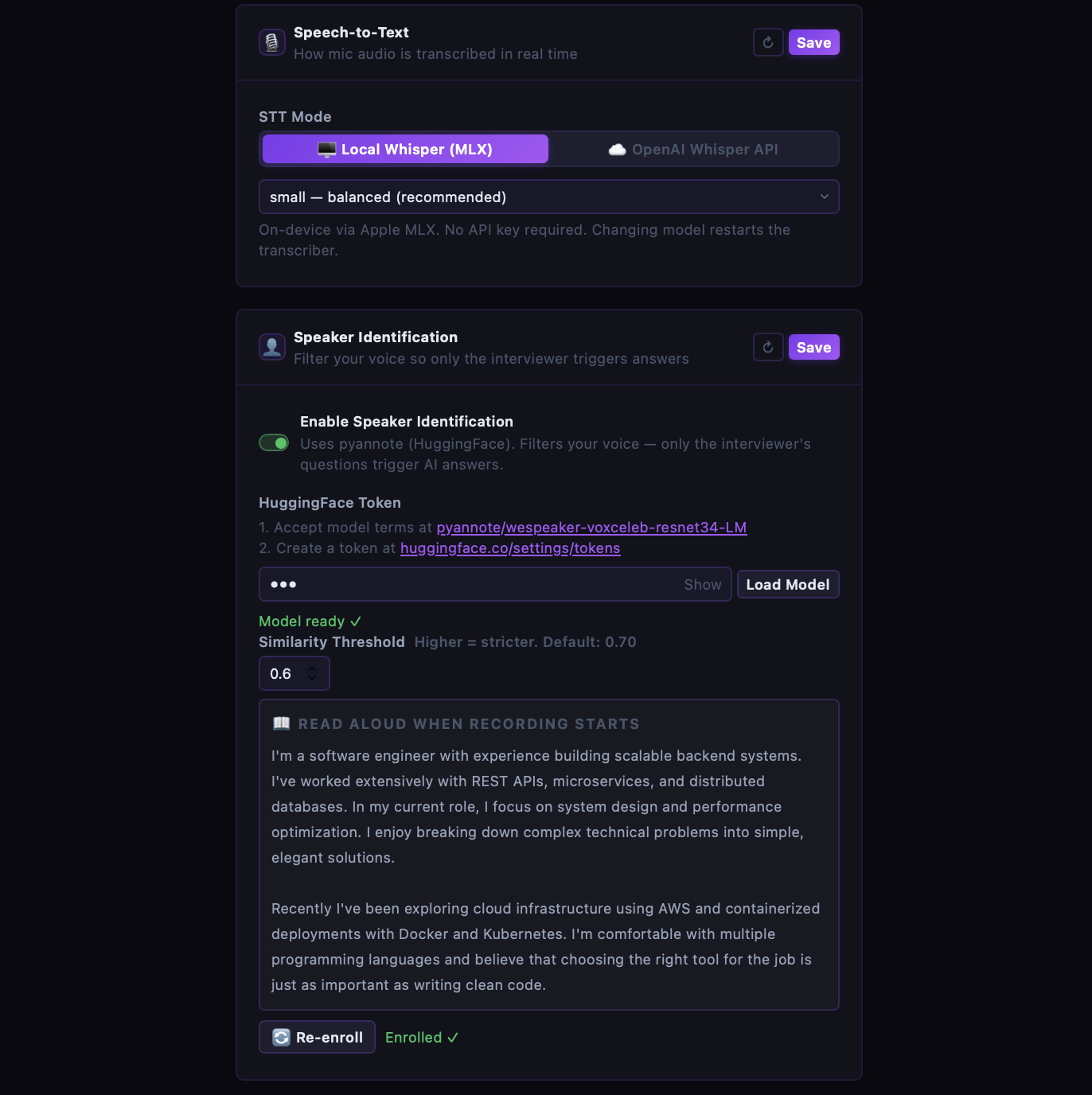
On-device STT

Whisper runs locally — MLX on Apple Silicon, openai-whisper on Windows. Zero API keys required for transcription. Works fully offline.

Conversation memory

Remembers the last 3–5 Q&A pairs. Follow-up questions like 'what are its features?' work correctly.

Streaming AI overlay

Answers stream as bullet points in real time into a frameless, always-on-top Electron window — right when you need them.

Screenshot analysis

Drop a screenshot and the app OCRs it with Tesseract + AI for instant analysis. Great for coding problems on screen.

Multi-provider fallback

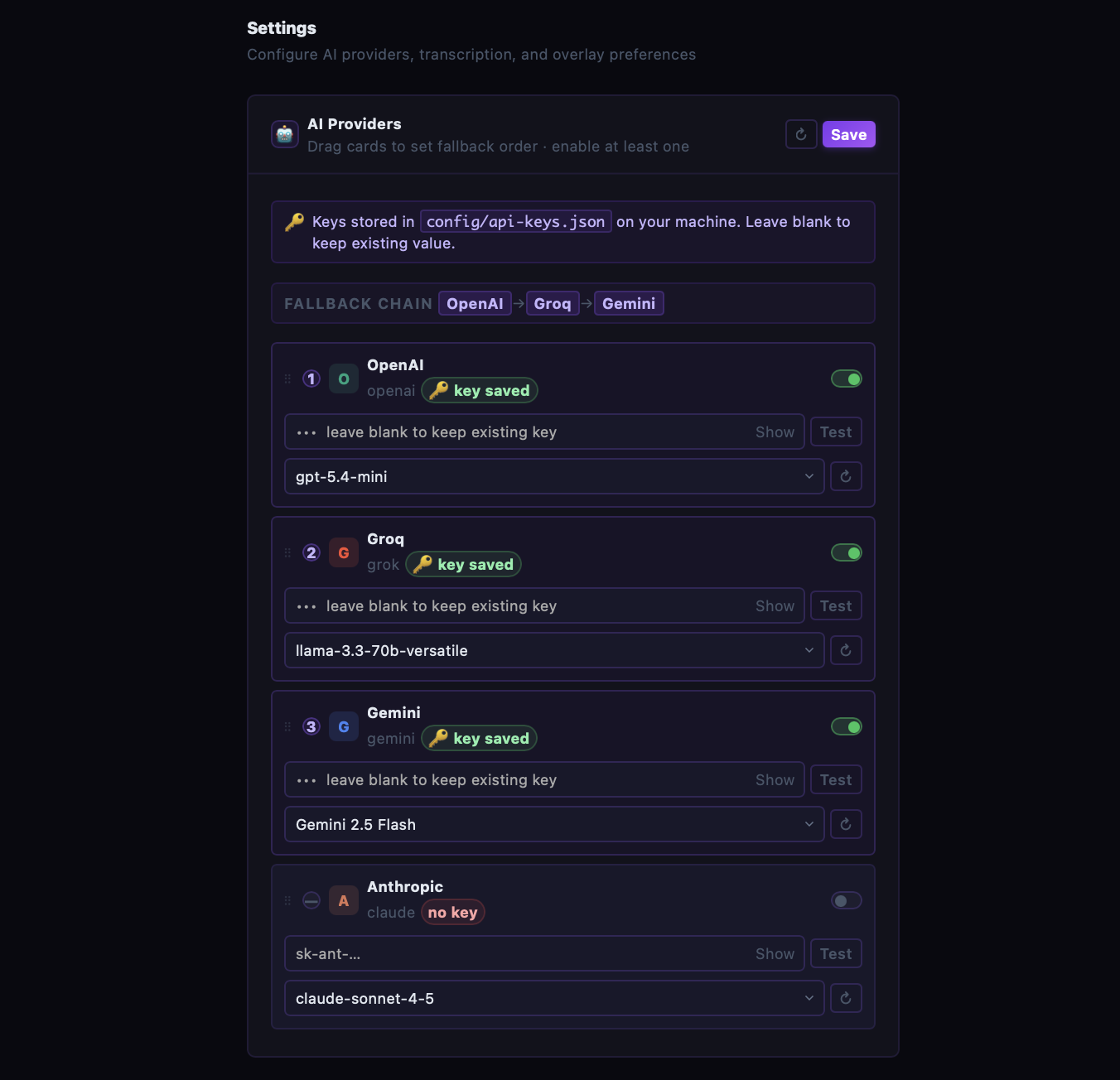
Configure OpenAI → Groq → Gemini → Claude as a cascade. If one fails or rate-limits, the next kicks in automatically.

Grafana observability

OpenTelemetry metrics and structured logs shipped to Grafana Cloud. Track AI latency, token cost, VAD, and Whisper decode times in real time.

Under the hood

How it works

Four stages, all running locally on your machine. From mic to HUD in under two seconds.

01

Interviewer speaks

Your microphone captures audio continuously. Silero VAD filters silence so only real speech is processed.

On-device · MLX (macOS) / CPU Whisper (Windows) · No API key
02

Whisper transcribes in real time

LocalAgreement-2 streaming decoder commits words every 300ms, giving you a live partial transcript as the question unfolds.

Committed words · Tentative words
03

AI generates your answer

The question hits your configured AI provider chain. If one fails, the next takes over. Answers stream token-by-token.

OpenAI → Groq → Gemini → Claude → Ollama
04

HUD shows it — only to you

Answer bullet points appear in a frameless invisible overlay. Screenshare, recording, and screenshots cannot capture it — on macOS and Windows.

setContentProtection(true)
Architecture at a glance
Mic ──► Python Whisper (MLX on macOS · CPU on Windows)
           │  stt_partial (300ms) / stt_final (silence)
           ▼
     Node.js Backend (Express + Socket.IO)
           │  ai.service → OpenAI / Groq / Gemini / Claude / Ollama
           ▼
     Electron HUD (always-on-top, content-protected)
           │
Screenshots ──► OCR (Tesseract) ──► AI ──► HUD

Get running in minutes

Quick start

One command installs everything. Pick your platform below.

Apple Silicon (M1 – M4) — uses MLX Whisper for GPU-accelerated on-device STT
1

Clone & first-time setup

Installs Homebrew, Node.js, Python, Ollama, and all dependencies automatically. MLX Whisper pre-warms on first launch.

terminal
git clone https://github.com/parmeet10/solveWatchAi.git
cd solveWatchAi
./start.sh --setup
2

Add your AI keys

Open the settings page and configure at least one provider. Keys are stored locally — never sent anywhere else.

browser
# After ./start.sh opens, visit:
http://localhost:4000/settings
3

Start the app

Launches Node.js backend, MLX Whisper transcriber, and the invisible Electron HUD overlay.

terminal
./start.sh

# Toggle HUD:    ⌘ Shift H
# Toggle listen: ⌘ Shift X

Shortcut keys — macOS

⌘ Shift HToggle HUD overlay on / off
⌘ Shift XToggle listening on / off

Your choice

Works with all major AI providers

Configure a fallback chain — if one rate-limits, the next kicks in automatically.

O

OpenAI

gpt-4o-mini

G

Groq

llama-3.3-70b

G

Gemini

gemini-2.5-flash

A

Anthropic

claude-sonnet-4-5

O

Ollama

llama3.2:1b (local)

Fallback chain — fully configurable

OpenAIGroqGeminiAnthropicOllama

Settings

Configure everything in the browser

Open http://localhost:4000/settings after starting. Keys stored locally — never sent anywhere.
🤖
AI Providers & Fallback Chain
Configure keys, enable providers, and drag to set the fallback order.
AI Providers & Fallback Chain
🎙️
STT & Speaker Identification
Switch between on-device Whisper and OpenAI API, and enroll your voice to filter yourself out.
STT & Speaker Identification
Privacy first

Everything stays on your device

No cloud storage. No telemetry. No surprises.

Zero telemetry

No usage data, no analytics, no crash reports sent anywhere. The only outbound calls are to your own AI provider API keys.

Keys stored locally

API keys live in config/api-keys.json on your machine — gitignored by default. Never transmitted to any server we operate.

STT runs on-device

Whisper via Apple MLX processes audio locally. Your conversation never leaves your Mac unless you choose OpenAI Whisper API mode.

How we compare

SolveWatch vs Cluely vs Parakeet

The tools are similar on the surface. The differences are in cost, latency, and how much you trust a closed cloud with your interview audio.

FeatureSolveWatch
open-source
Cluely
closed / paid
Parakeet
closed / paid
PriceFree (MIT)$29–$49/mo$20–$40/mo
API cost
who pays the LLM bill
Your keys onlyIncluded (their cloud)Included (their cloud)
Open source
Invisible in screen share
full screen + window
Offline STT
transcription without internet
Fully offline mode
AI answers without internet (Ollama)
Custom AI provider
bring your own OpenAI / Groq / etc.
Response latency
first token
~200–400 ms~600–1200 ms~500–900 ms
Screenshot OCR
analyse a coding problem on screen
macOS support
Windows support

Competitor data based on publicly available pricing and feature pages. Latency figures are approximate and vary by model and network.

Learn more

How SolveWatch actually works

Deeper guides on the invisibility layer, the latency architecture, and the full audio-to-answer pipeline.

Deep dive

How screenshare invisibility works

setContentProtection(true) is an OS-level API — the same one banking apps use. Here's exactly why Zoom and OBS can't capture the HUD even during full-screen share.

Read more
Deep dive

Why SolveWatch is fast

Streaming tokens, Groq's LPU inference, and LocalAgreement-2 commit-before-silence — the architecture decisions that get answers in under 400 ms.

Read more
Deep dive

The STT + AI pipeline

From mic audio to answer on screen: VAD → rolling buffer → Whisper on-device → Node backend → multi-provider AI → streamed HUD overlay.

Read more
Deep dive

Grafana + OpenTelemetry setup

How SolveWatch ships OTel metrics and structured logs from both the Node backend and Python transcriber to Grafana Cloud — without touching the hot path.

Read more

FAQ

Common questions

Everything you need to know before installing.

Yes. SolveWatch uses setContentProtection(true), an OS-level API (the same one banking and DRM apps use). It excludes the overlay from both window capture and entire screen capture. Confirmed invisible on Zoom, Google Meet, Microsoft Teams, Loom, and OBS on macOS and Windows.

Yes. SolveWatch is MIT-licensed — free for personal and commercial use, forever. You only pay for the AI provider API calls you make with your own keys (or use Ollama locally for zero cost).

With Groq (llama-3.3-70b), first token typically arrives in 200–400 ms. Gemini 2.5 Flash is similarly fast. Answers stream token-by-token directly into the HUD, so you start reading before the model even finishes generating. Screenshot-based answers (OCR + AI) complete in under 2 seconds end-to-end.

Transcription is fully offline — Whisper runs on-device via Apple MLX (Apple Silicon) or openai-whisper (Windows). For AI answers, you need your provider's API. If you want 100% offline, configure Ollama as the provider — it runs local LLMs with no cloud calls at all.

SolveWatch has a built-in fallback cascade. If the primary provider fails or rate-limits, it automatically falls back to the next one in your configured order (e.g. OpenAI → Groq → Gemini → Claude). Failed providers cool off and retry on the next request — no manual intervention needed.

The creator

About & Contact

Built by a developer who got tired of going blank in interviews.

About me

I'm a full-stack developer passionate about building tools that make developers' lives easier. SolveWatch AI was born from real interview pain — I wanted an assistant that stays invisible while actually helping.

View Portfolio

Get in touch

Found a bug? Have a feature request? Want to collaborate? Drop me a message — I read every email and reply to all of them.

sparmeet162000@gmail.com